As you know, we live in a new world of technology today.
Visiting your local bank, using a checkbook to write down spending, receiving your bills in the mail, and writing out your budget on paper, still have merit, but can be automated with software and online services to save you time.
Time and accuracy are the most notable advantages of technology.
As a volunteer financial coach, I often hear people complain about the time required to budget, track spending and save. In my opinion, these are responsibilities that shouldn’t ever be overlooked if you want to achieve financial goals, but I must admit, they do require an investment of time (although, small) if you want to reap the benefits.
I love using technology to help me automate the management of my finances so I thought I would share a few tools I like best.
Quick Navigation
Automated Savings Accounts: Qapital Savings

For many of us saving money will never happen if we don’t put something in place to make it happen automatically.
Qapital is a new financial service that was just launched that helps to automate saving money, without any interaction needed from the account holder.
You just sign up for an account, link it to your checking account and mobile phone (where most of the banking occurs), and then Qapital will analyze your checking account balance and spending trends. When Qapital determines an amount it thinks it can safely save without causing problems for you, it will automatically debit your checking account and pull it into your Qapital savings.
The amounts that the account saves are typically small, anywhere from a few dollars up to a few dollars or more. Over time, however, they add up to larger amounts. Peter has been using them to automatically save and has saved around $1400 in a few months! Read a full review of Qapital here.
Budgets: You Need a Budget (YNAB) & Tiller Money
The key features I look for in money management software are budgeting and mobile spending.

I meet with a lot of people and first teach them budgeting skills the old fashion way by writing everything down. They have to write a budget on paper, use a spending diary (their paper envelope budgeting system) and keep track of spending in their checkbook. As stated before, it’s a time investment, but a little bit of work each day goes a long way in helping you manage your spending well.
You Need A Budget (YNAB) provides the way to automate all of this and adds the convenience of tracking spending on the go via the mobile app. Every transaction you enter keeps your checking register updated as well as deducts the amount from the assigned budget category. It also uses your location services on your phone to remember where you spend money so you don’t have to re-enter this information next time!
What is really great about YNAB, is the ease of use. They make all this simple whereas some software has confusing user interfaces or try to assign budget categories to transactions for you. Most people get YNAB and have fun using it.
Tiller Money is another budgeting software that can help you to automate your budget. It is a Google Sheets budget spreadsheet that you can set up to automatically download your transactions from your banks, automatically categorize them and then tell you how you’re doing on your budget.
Tiller also has an Excel spreadsheet available, and I highly recommend giving it a try. Read a full Tiller Money review here.
Mobile Check Deposit: Capital One & Ally
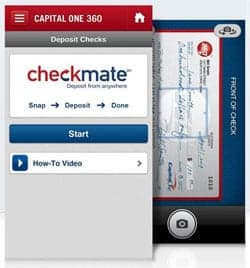
Capital One 360, Ally, Bank of America and Chase all provide the capability of depositing checks into your checking and/or savings accounts via your mobile phone. I bank with Chase for my business banking needs and have recently found this feature to be quite handy.
I’m not sure how they make all this work, but it is truly amazing! I received a check in the mail the other day, logged into my Chase account via my iPhone, took a picture of the check and deposited it.
This feature alone saved me a trip to the bank, which we can all appreciate today with the high gas prices!
Automated Investing Services: Betterment, Wealthfront & M1 Finance

Another relatively recent invention is the advent of the automated investment advisor. These services will automatically invest your money for you in a low-cost index fund, for a small fee.

These services typically have a long-term outlook, and you can tailor them to invest for you based on your current age, the level of risk you’re comfortable with, and more.

All of them allow you to set up automated deposits, making it even easier to invest. Three of my favorite robo-advisors (as many call them) are:
Automate Your Finances
I know there are many more financial tools out there, but I see these as a few of the core tools I’ll use for quite some time. At least until the technology evolves again!
These tools save me a lot of time and help me keep my money management to just a few healthy minutes per day.
How do you automate the management of your finances?





Great tools! I wanted to try Betterment once but they don’t take accounts from EU. Have you ever used M1 Finance yourself? Have any idea of the best robo-investors for EU citizens? Cheers!