An app that has become extremely popular with personal finance bloggers in the past few years is Empower.
This website and mobile app is a financial aggregation application that works kind of like Mint.com, but takes it up a notch.
One of the complaints that many people have against Mint is that it doesn’t work as well with investment tracking. If you have some investments, and you want a clearer, automatically updated, view of your finances, Empower might be a product that you’ll want to give a try.
Quick Navigation
Overview Of Empower

Like many web-based financial apps, Empower can connect to your accounts, and pull information about your finances from various sources, including checking and savings accounts and credit card accounts.
You can connect your brokerage account, and many companies that manage retirement accounts can also be connected. You can also add mortgage accounts and get updated information on your balance and payments.
By adding all of your account types you can get an overall view of what your total financial picture looks like.
While there are still a few bugs to be worked out with some of the account connections, and with some of the functionality, the process is mostly smooth.
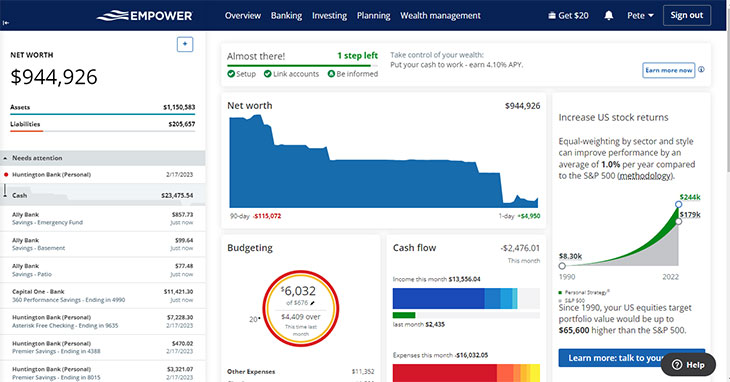
Empower is aimed at a population that is sort of “in-between” middle class and upper middle class. It’s for people who have some investments, and maybe own more real estate than their primary residence.
It’s aimed at those who have a more complex financial picture than those who gravitate toward Mint.com, but who also might not have a high enough net worth to warrant high-end asset management.
Empower is great for those who have more assets, and a wider variety of assets, and want to manage it themselves.
Here’s a quick video look at what Empower has to offer.
Empower – Free To Use
Empower is currently completely free to use for new users. It’s an easy sign-up process, and you’ll only need some of your basic information to get started, including logins for any banks or brokerages you want to add to the software.
Mobile Apps
Empower also has a full suite of mobile apps for customers to use, once again – at no cost. There are iOS and Android apps available.
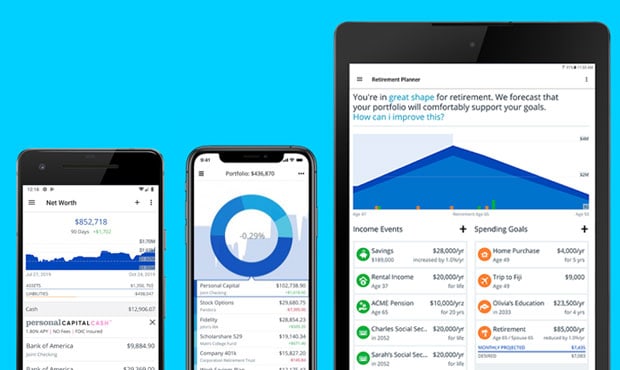
I’ve used the Android app and it is easily one of the nicest-looking and most useful financial apps out there right now. I use it on my Android tablet, and it gives you an overall picture of your financial situation from bank accounts and investments to mortgages and other debts.
If you sign up for an Empower account, be sure to take advantage of their apps as well.
Get Expert Help
Even though Empower is initially free to use, it does have costs if you want to “upgrade.” Empower also offers an asset management service.
If you have at least $25,000 in manageable assets, you can pay a fee of 0.89% to have the financial experts at the company manage your money.
For some of those who want a little help, but don’t have the number of assets that warrant attention from other management companies, Empower can provide a service that can help. It’s also possible to get access to financial advisers, even if you don’t ultimately place your assets under management at Empower.
Not only can you track your spending, and investment performance with Empower, but the app will also provide you with advice. The investment fees you are paying are analyzed by Empower, and the app can recommend different options that can reduce what you’re paying. Additionally, your asset allocation is prominently displayed, along with trends in your spending, saving, and investing.
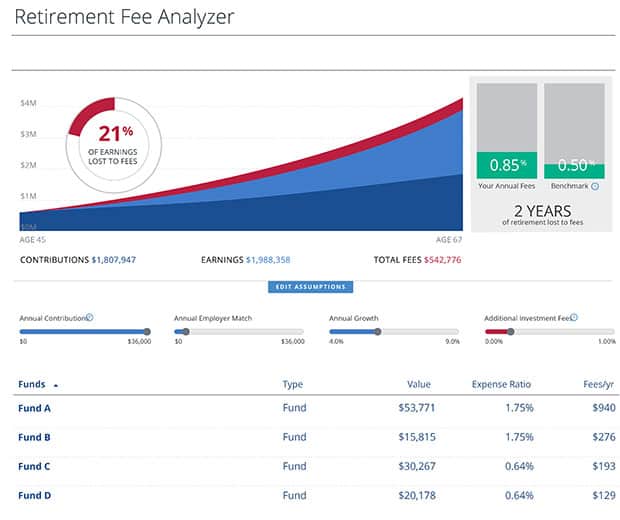
You can also receive free analysis of your asset allocation, and how it matches up with your goals, as well as tips for tweaking your investment strategy.
Empower Gives A Comprehensive Look At Your Finances
Empower offers one of the most comprehensive pictures of your financial situation, a more complete picture than some other sites are able to offer.
If your financial picture includes multiple investment accounts and a variety of other accounts, Empower can help you manage everything since it is more than a budgeting app; it’s a true money management app.
Sign Up For Your FREE Empower Account
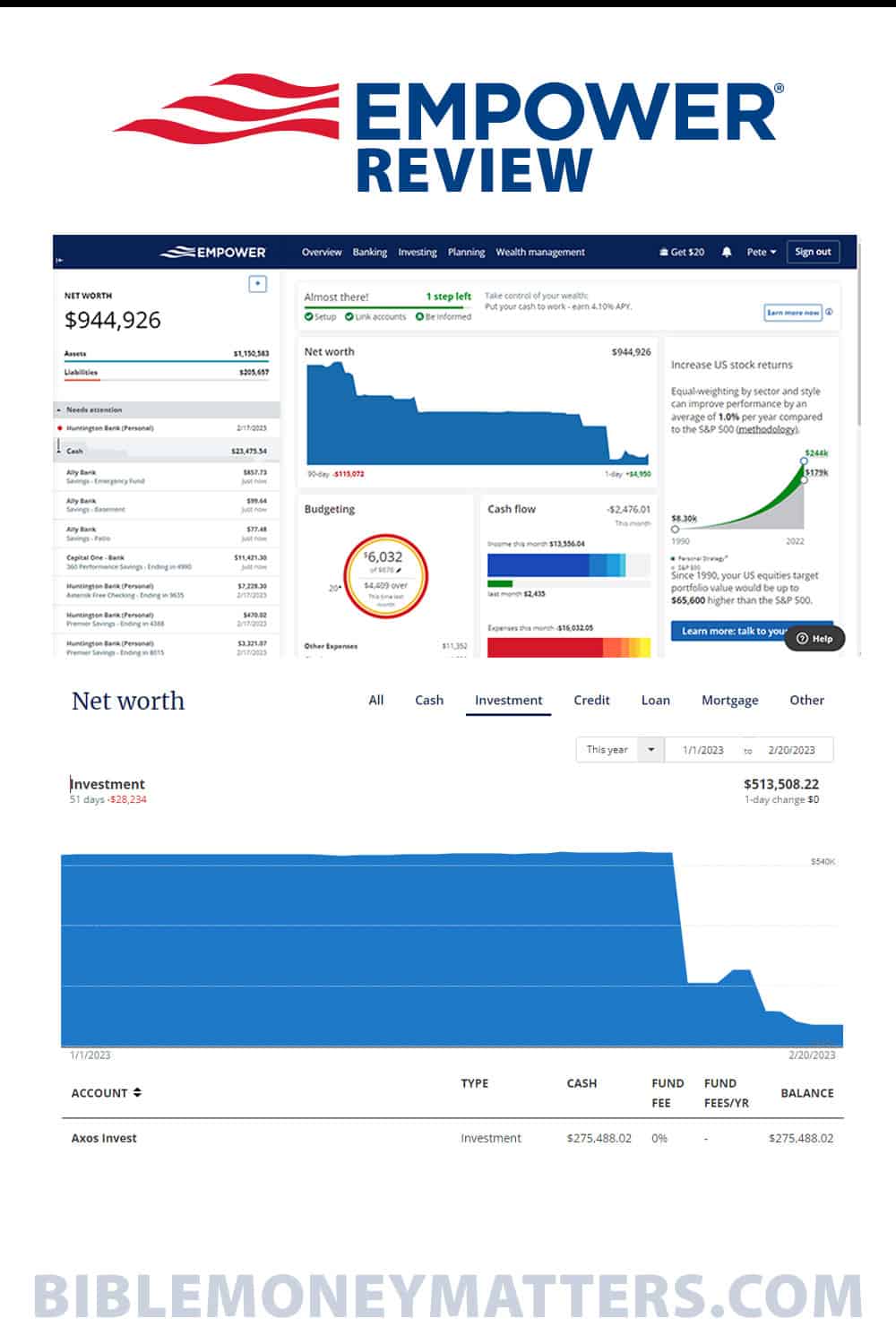







This is the second time I’ve read about Empower (here and on another site). I think I might give them a try and see what they are all about. Currently, I’m a Mint user but I’m always on the look out for better products and services.
One thing I really enjoy about Mint.com is the weekly net worth snapshots. I don’t have the time or desire to constantly be logging into Mint to check my net worth so a weekly summary is quite useful and nice reminder that things are indeed (for the most part) going up.
Is there something similar with Empower?
I know they have a net worth report on the website, and they’ll send weekly or daily summary emails if you want them to:
Empower will send you a daily summary of your accounts and a weekly performance report depending on the preferences you have setup in the ‘Alerts’ section of your profile.
I’m not 100% sure if the emails have the net worth report on them though as my account i had the emails turned off.
Hi Guys,
Joe from Empower here. We do have a weekly summary email which goes out with a summary of your net worth. We also have an optional daily email which you can turn on through your personal settings once your logged in.
Happy to help if you have any other questions/comments/concerns!
How is the $10 dispersed out? I added 2 accounts but it doesn’t mention anything about the $10.
When you click on the link to Empower on this page it should give you a note about starting an account and getting $20.
As far as how the money is dispersed, I’m not really sure. I’ll have to check with their support to find out – I didn’t sign up through a referral link myself, so I didn’t get the $10 bonus. I’ll report back once I get an answer from support.
UPDATE: In reading reviews on other sites it appears that they may pay out the bonus via Paypal. I’ll report what they say when they email me back.
UPDATE 2: Empower support responded back, “The bonus needs to be processed and approved by our team before we can send the payment to your account. This could take up to 10 business days to complete. It is distributed through PayPal. Please check back with us if you haven’t received your bonus 10 days after you initially signed up.“
Thanks Peter!
But this is for the US market/users only, right?
I believe it is US users only, however, I’m not sure about that. They do have a contact page where you can contact them if you have questions about whether you’re eligible to use their service. personalcapital.com/contact-us
I still have privacy and security concerns. Maybe they’re an honest company, but how do I know that someone else won’t be able to hack into their data? I manage mine in a spreadsheet of my own design… not as comprehensive, but it does the trick and it’s much more customizeable :)
Empower is about as secure as they come when it comes to your data. In fact, I’ve personally found it a little annoying at times, more secure than a lot of other sites I visit. From their site:
They are also staffed by some well-known people in the financial industry, so you know they’re not a fly-by-night operation. Their CEO is former CEO of PayPal and others on their management team come from places like Quicken, Passmark and Eloan among others. They’re got a solid team, and I assume they’ll be around for years to come.
I was wondering if PC has a way to print reports. I currently use Quicken desktop because I can print a report at the end of the year and provide it to my CPA. I tried Mint, but it doesn’t have any report functionality. Does PC offer this at all? I would like to move away from Quicken, but printable reports are a must.
Thank you.
Dan B.
Printing is a requirement for me. How will PC support this?