A Real-World Look at the Explorer 5000 Plus, SolarSaga 500 Panels, and Smart Transfer Switch
When the power goes out in Minnesota where I live — whether it’s a summer storm, a winter ice event, or just the construction in my neighborhood, the question isn’t if it’ll happen again. It’s when. After researching our options and weighing the costs against available tax incentives, we pulled the trigger on a full Jackery Whole Home Backup system: the Explorer 5000 Plus power station, two SolarSaga 500 solar panels, and the Smart Transfer Switch. Here’s everything we learned — from unboxing to installation to what it actually costs after rebates.
As a BibleMoneyMatters.com reader, get a 5% stackable discount on your first Jackery order by using our link: Jackery Home Backup SolutionsQuick Navigation
What Is the Jackery Explorer 5000 Plus System?
The Jackery Explorer 5000 Plus system is a modular, solar-capable home battery backup solution designed to keep your essential circuits running during a power outage — without a gas generator, without fumes, and without the noise. At its core, it’s a large-capacity lithium iron phosphate (LiFePO4) battery paired with a smart subpanel that integrates directly with your home’s electrical system.
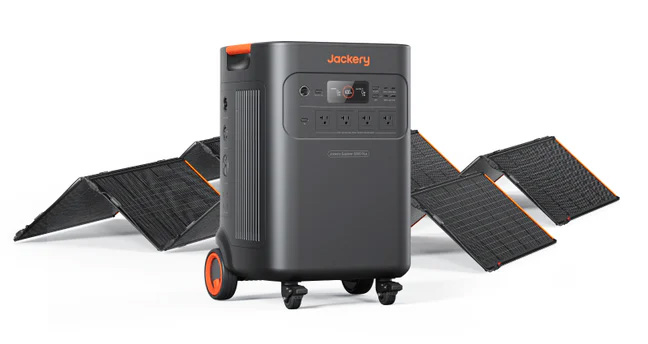
Think of it as a quiet, rechargeable whole-home emergency power source that sits in your utility area, stays topped off via solar panels or the grid, and kicks on automatically the moment your power goes out — in milliseconds, not minutes.
Unlike traditional standby generators, there’s no engine to maintain, no fuel to store, no carbon monoxide risk, and no noise ordinance to worry about. And unlike a simple portable battery bank, this system integrates permanently into your home’s electrical panel, powering specific circuits you choose during an outage.
The Three Components
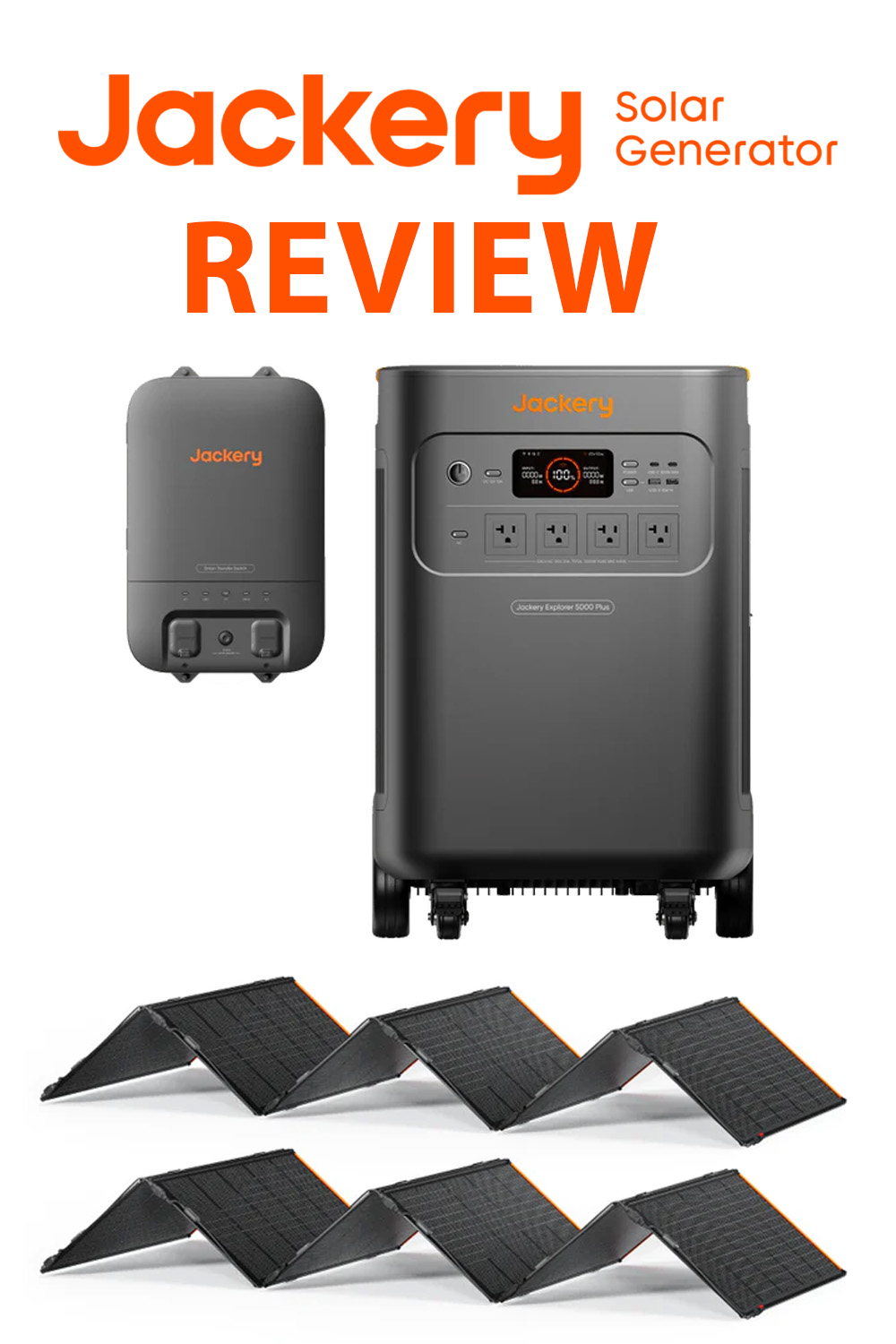
The system we purchased consists of three distinct products that work together:
- Explorer 5000 Plus — the main battery and inverter unit
- SolarSaga 500 X Solar Panels (x2) — the solar charging source
- Smart Transfer Switch (STS) — the electrical hub that connects the system to your home
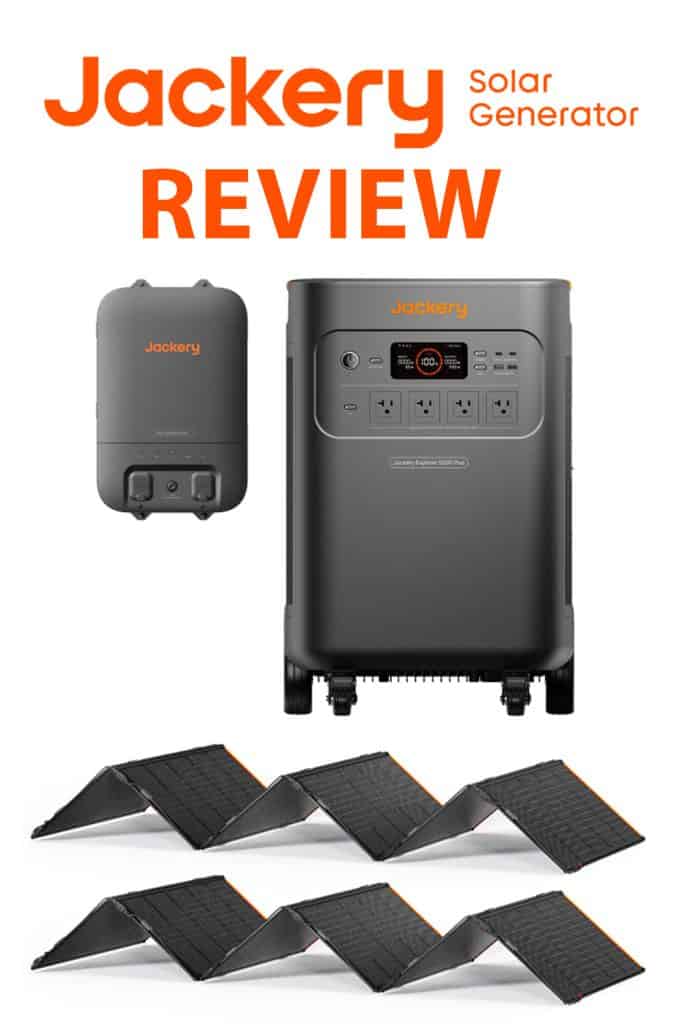
Together, these components form what Jackery calls a “Solar Home Kit” — a complete backup power ecosystem. Each piece can be understood on its own, but the real value comes from how they work in tandem.
Component #1: The Explorer 5000 Plus Power Station
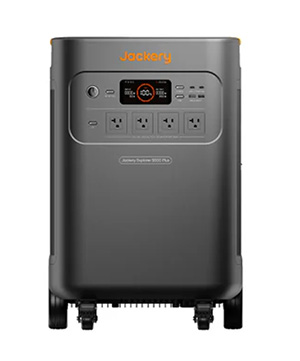
The Explorer 5000 Plus is Jackery’s flagship product and the heart of the system. It’s a substantial piece of equipment — 134 lbs. on wheels — but impressively compact given how much power it stores and delivers.
Key Specifications
| Battery Capacity | 5,040 Wh (expandable up to 60 kWh with additional battery packs) |
| Battery Chemistry | LiFePO4 (Lithium Iron Phosphate) — automotive-grade ceramic cells |
| AC Output | 7,200W continuous / 14,400W peak (120V and 240V dual voltage) |
| Solar Input | 4,000W maximum via MC4 connectors |
| AC Input (Wall) | 1,800W |
| Charge Time (Hybrid) | As fast as 1.7 hours |
| Cycle Life | 4,000 cycles to 70% capacity (~10+ years of regular use) |
| UPS Switching Time | 0 milliseconds (instantaneous) |
| Operating Temp | Reliable performance from -4°F to 104°F |
| Display | 3.95-inch color touchscreen |
| App Control | Yes — WiFi and Bluetooth via Jackery App |
| Weight | ~134 lbs. with built-in wheels and retractable handle |
| Noise Level | Virtually silent (~30 dB) |
| Warranty | 5 years (standard 3 + 2 years with registration) |
What Makes It Different
True 240V output. Most portable power stations only output 120V. The Explorer 5000 Plus delivers genuine split-phase 240V — the same voltage required by well pumps, electric dryers, central air conditioning units, and electric ranges. This is a significant differentiator from most competitors at this price tier.
Instantaneous UPS switching. The unit’s 0-millisecond switchover time means that when grid power fails, the transition to battery power is imperceptible to your electronics. Computers don’t reboot. Clocks don’t blink. Medical equipment doesn’t skip a beat. This is Online UPS mode — the highest level of protection available.
LiFePO4 chemistry. Not all lithium batteries are created equal. LiFePO4 chemistry is significantly more thermally stable, longer-lived, and safer than the NMC (nickel manganese cobalt) batteries found in many competitors. It’s the same tech used in automotive and industrial applications. Jackery’s cells are also ceramic-grade, rated to withstand extreme temperatures.
Scalable capacity. The 5,040Wh base is impressive on its own, but the system supports up to five expansion battery packs per unit — and through the Smart Transfer Switch, you can connect two Explorer 5000 Plus units, scaling all the way to 60 kWh. That’s enough to power an average American home for 3+ days without any solar recharging.
What’s In the Box: Explorer 5000 Plus
- 1x Explorer 5000 Plus power station
- 1x AC charging cable
- 1x MC4 wrench (for solar connections)
- 1x User manual / quick start guide
Note: The unit ships in a large, heavy box and is a two-person lift. Jackery uses sturdy cardboard corner bumpers and foam inserts for protection. Despite the size, the build quality out of the box inspires confidence — this is not a product that feels cheap or prototype-ish. The retractable handle and built-in wheels are solid and functional, and the side handles make team-lifting manageable.
Component #2: SolarSaga 500 X Solar Panels (x2)
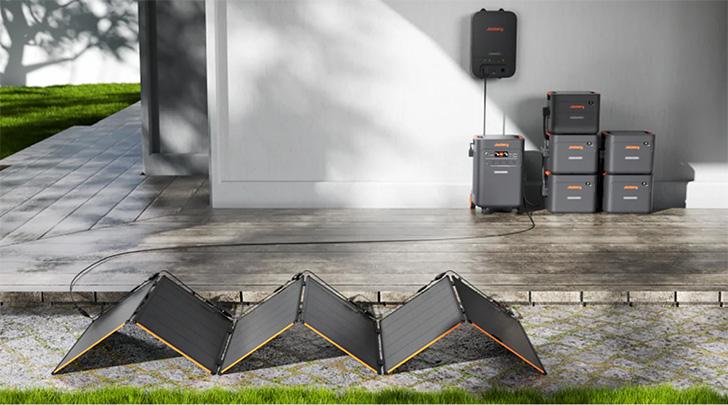
The SolarSaga 500 X is Jackery’s highest-output portable solar panel, purpose-built to pair with the Explorer 5000 Plus. We purchased a package deal that had two panels for a combined solar input of up to 1,000 watts — enough to meaningfully recharge the battery throughout a sunny day, even in Minnesota.
Key Specifications — SolarSaga 500 X (per panel)
| Power Output | 500W (composed of six 85W SolarSaga modules) |
| Cell Technology | TOPCon monocrystalline bifacial cells |
| Conversion Efficiency | Up to 25% |
| Design | Bifacial — captures light from both front AND rear surfaces |
| Waterproof Rating | IP68 (fully waterproof and dustproof) |
| Operating Temperature | -40°F to 185°F |
| Folded Dimensions | Compact and portable with storage bag included |
| Unfolded Dimensions | Approx. 98″ x 39″ x 11.6″ per panel |
| Modularity | Six independent 85W panels, usable separately or combined |
| Connector Type | DC8020 (proprietary, compatible with Explorer 5000 Plus) |
| Warranty | 5 years |
What Makes These Panels Stand Out
Bifacial design. Most solar panels only capture sunlight from the front. The SolarSaga 500 X uses bifacial cells that also harvest reflected light from the surface beneath them — ground, concrete, snow, sand. In real-world tests, this can meaningfully boost output, especially in Minnesota winters when snow reflection is a factor.
25% conversion efficiency. This is at the high end of what consumer solar panels offer. Standard panels typically convert 17–20% of sunlight into electricity. TOPCon cell technology achieves more with the same amount of sunlight — important when panel placement or available sun hours are limited.
Modular construction. Each SolarSaga 500 X is actually six 85W SolarSaga panels hinged together. These individual panels can be detached and used separately if your setup requires it, making the system unusually flexible for different yard configurations or partial-shade situations.
IP68 rating. IP68 is the highest level of dust and water resistance available. These panels can handle rain, snow, and dusty environments without issue. That said, Jackery recommends bringing them in during extreme weather like hail or high winds.
Two panels = 1,000W combined. The Explorer 5000 Plus can accept up to 4,000W of solar input. With two SolarSaga 500 X panels, we’re delivering up to 1,000W — enough to meaningfully recover battery capacity throughout a day and potentially run essential loads simultaneously during daylight hours.
What’s In the Box: SolarSaga 500 X (each panel)
- 1x SolarSaga 500 X solar panel (6 hinged 85W modules)
- 1x Solar charging cable (DC8020 connector)
- 1x Storage bag
- 10x Hinges
- 8x Ground stakes
- 1x Hex key
- 40x Screws
- 2x Anderson rubber plugs
- 1x User manual
The panels arrive in a box that’s manageable for one person and are well-packed. Setup is genuinely DIY-friendly — the ground stakes and hinges allow you to prop the panels at an optimal tilt angle (approximately 35 degrees is recommended) without any permanent mounting. For our setup, I just put the panels together, and put them in the storage bag, to be used if/when we need them.
Important note: The SolarSaga 500 X is not designed for permanent rooftop installation. It can be semi-permanently mounted on balconies, railings, carports, or ground-level structures using non-permanent methods. Ours would be placed in our front yard as needed, attached to the unit in the house via a solar passthrough port.
Component #3: The Smart Transfer Switch (STS)
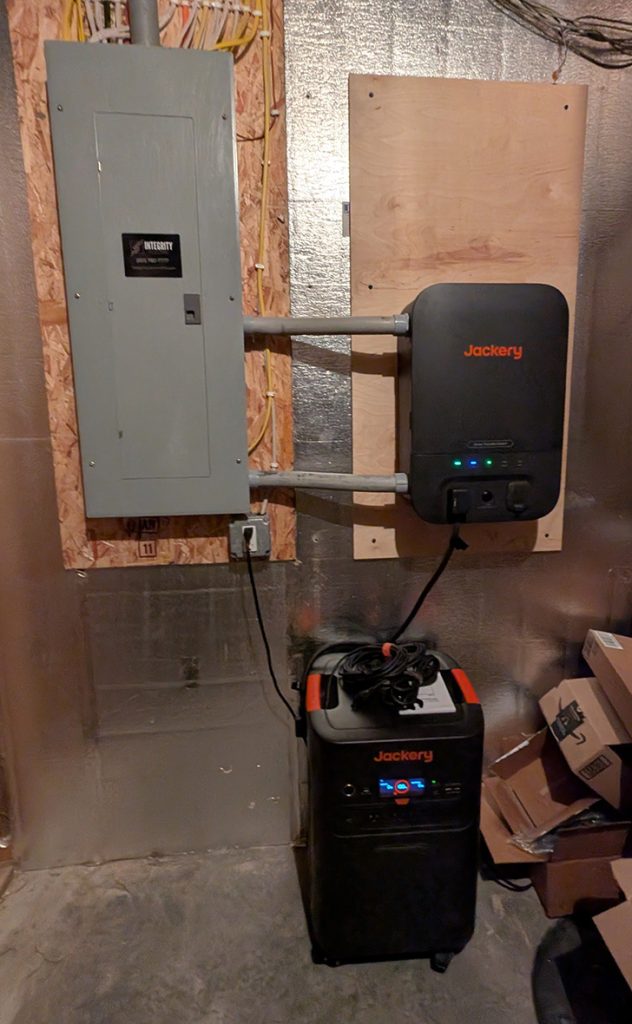
The Smart Transfer Switch is the piece that transforms the Explorer 5000 Plus from a very large portable battery into a whole-home backup system. It’s a compact electrical subpanel that gets professionally installed next to your main electrical panel, connecting the Jackery battery to specific circuits in your home.
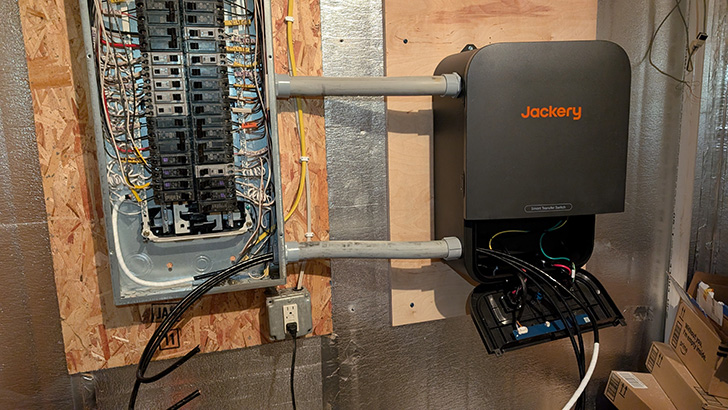
This is where Jackery’s approach stands out from the competition. Rather than using a simple external switching box, the STS functions as a genuine electrical subpanel with built-in breakers. You can select up to 12 of your home’s 120V circuits (or up to 6 circuits at 240V) to back up — and those circuits automatically switch to battery power the moment the grid goes down.
Key Specifications — Smart Transfer Switch
| Compatible Units | Jackery Explorer 5000 Plus only (up to 2 units) |
| Switchover Time | ?20ms (effectively instantaneous for most electronics) |
| Input Requirement | Split-phase 240V |
| Output | 120V/60Hz and split-phase 240V/60Hz |
| Max Circuits | 12 circuits at 120V, or 6 circuits at 240V (or a combination) |
| Max Per Circuit | 240V / 30A / 7,200W |
| UPS Mode | Available when activated via app; requires 5000 Plus pairing |
| App Control | Yes — full control via Jackery App |
| Indoor Installation | Required (not waterproof) |
| Warranty | 2 years |
How the STS Works
Under normal conditions, your home runs on grid power — just like always. The Explorer 5000 Plus sits connected to the STS, either maintaining a full charge or slowly cycling as a buffer depending on your app settings.
When grid power fails, the STS detects the outage and switches the selected circuits to battery power within 20 milliseconds. For practical purposes, this is fast enough that most electronics — computers, routers, refrigerators, medical devices — don’t register any interruption at all. Lights don’t flicker. Clocks don’t reset.
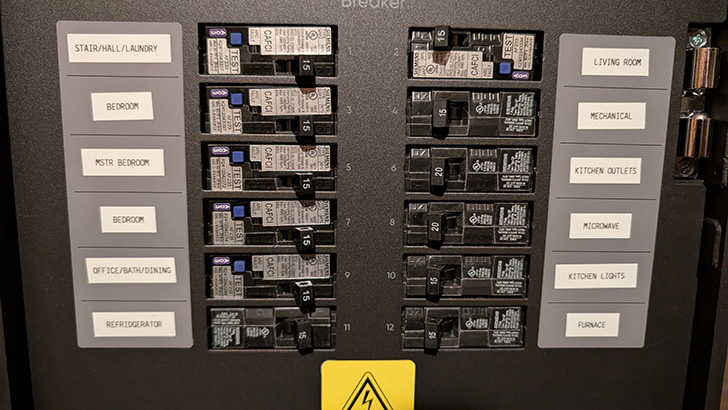
The circuits NOT connected to the STS simply go dark, just as they would in a normal outage. This is by design — you’re backing up only your essential loads, which extends how long the battery lasts.
When grid power returns, the STS automatically switches back.
Working Modes via the Jackery App
Backup Reserve Mode (default): The system keeps the battery charged and only uses it during an outage.
Self-Powered Mode: Solar energy powers your selected circuits directly; battery stores the excess. Great for maximizing solar use.
Time-of-Use / Peak Shaving: Charge the battery during off-peak hours (cheaper electricity) and discharge it during peak rate periods. This can meaningfully reduce your monthly electric bill if you’re on a time-of-use rate plan.
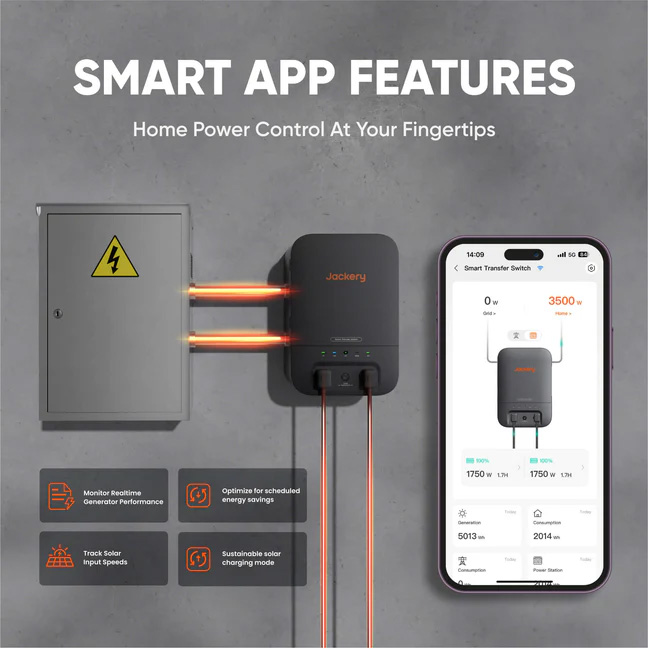
Peak Shaving: Saving Money Every Day, Not Just During Outages
One of the more underappreciated features of the Jackery system is its ability to save you money even when the grid is running fine. Through the Jackery App’s “Charging-Discharging Plan” mode, you can schedule the Explorer 5000 Plus to charge during off-peak hours — typically late night and early morning, when utility rates are lowest — and then discharge that stored energy back into your selected circuits during peak rate periods, when electricity costs the most. For homeowners on a time-of-use (TOU) rate plan, this kind of peak shaving can generate real, ongoing savings. The spread between peak and off-peak rates varies by utility and region, but in many markets that spread ranges from $0.10 to $0.25 per kilowatt-hour or more.
| Rate Differential (Peak vs. Off-Peak) | Daily Savings (5,040 Wh battery) | Annual Savings (est.) |
| $0.10/kWh | ~$0.50/day | ~$183/year |
| $0.15/kWh | ~$0.75/day | ~$275/year |
| $0.20/kWh | ~$1.00/day | ~$365/year |
| $0.25/kWh | ~$1.26/day | ~$460/year |
Estimates assume a full daily discharge cycle. Real-world savings will vary based on actual usage, charging efficiency losses, and how consistently you cycle the battery.
Over the 10+ year lifespan of the LiFePO4 battery, even modest daily savings add up to a meaningful contribution toward offsetting the system’s total cost — on top of the backup protection you’re already getting.
The Downsides of Using Your Backup Battery for Peak Shaving
That said, running your battery in daily peak-shaving mode isn’t without trade-offs, and it’s worth going in with clear eyes.
It cycles the battery every day. The Explorer 5000 Plus is rated for 4,000 charge cycles to 70% capacity — impressive for a consumer battery, but not infinite. Using it for daily peak shaving means you’re burning through those cycles whether there’s an outage or not. At one full cycle per day, you’d hit 4,000 cycles in roughly 11 years. That math still works in most cases, but it’s different from treating the battery as a pure emergency reserve that might only cycle a handful of times per year.
You may not have the right rate plan. Peak shaving only makes financial sense if you’re on a time-of-use rate plan where peak and off-peak prices differ meaningfully. Many Minnesota utility customers — particularly those on standard flat-rate plans — won’t see any savings from this mode at all. Check your utility rate structure before banking on these numbers.
It reduces your available backup reserve. If the battery is scheduled to discharge during evening peak hours, and your power goes out at 7 PM, you may have significantly less stored energy than you would if the battery had been sitting at 100%. You can mitigate this by setting a minimum backup reserve threshold in the app — Jackery allows you to configure this — but it’s a trade-off to be aware of.
Charging efficiency isn’t 100%. Like all battery systems, the Explorer 5000 Plus loses some energy in the charge/discharge conversion process. Real-world round-trip efficiency is typically in the 85–90% range, which slightly reduces your effective savings compared to the simple math in the table above.
The savings ceiling is real. Even under favorable assumptions, peak shaving with this system is unlikely to save more than $300–$460 per year for most households. At that rate, it would take 10–16 years of consistent daily cycling to recover the system’s net cost through energy savings alone — and that assumes rate differentials stay favorable and the battery holds its capacity. The stronger financial case for this system remains the combination of backup value, tax credits (if captured in 2025), and energy savings together — not energy savings in isolation.
What’s In the Box: Smart Transfer Switch
- 1x Smart Transfer Switch subpanel
- Pre-wired labeled circuit cables
- Hardware for installation
- User manual and installation guide
Installation of the STS requires a licensed electrician. Jackery offers a referral service through their partner network. We sourced our electrician (who was great by the way) through Jackery.
How the Full System Works Together
Here’s the complete picture of how the three components function as a unified system:
Charging: The Explorer 5000 Plus charges via three potential sources simultaneously — the grid (through the STS), the SolarSaga panels, and any AC outlet. The unit optimizes charging across sources for the fastest possible recharge rate.
Monitoring: The Jackery App gives you real-time visibility into battery state of charge, solar input wattage, home consumption draw, and estimated run time. You can set charge/discharge schedules, configure backup reserve thresholds, and receive outage alerts.
Outage Response: When grid power fails, the STS switches the selected circuits to battery in 20ms. Solar panels continue contributing power during daylight hours, effectively extending run time. The battery manages the load across all connected circuits simultaneously.
Recovery: Once the grid returns, the system automatically switches back and begins recharging the battery from the grid. Solar panels continue contributing throughout the day.
In a real-world Minnesota winter scenario — a multi-day ice storm, for example — this system running with two SolarSaga panels could keep a refrigerator, freezer, sump pump, router, some lighting, and phone charging running for several days, depending on weather and load.
The Real Cost Breakdown
Let’s talk numbers — because this is a substantial investment, and understanding the true out-of-pocket cost after tax incentives is essential to evaluating whether it makes sense for your household.
Equipment Costs (After Coupons and Promo Codes)
| Item | List Price | Our Cost |
| Explorer 5000 Plus Power Station | Varies | |
| SolarSaga 500 X Panel x2 | Varies | |
| Smart Transfer Switch | Varies | |
| Total Equipment (after discounts) | $4,778.37 |
Jackery frequently runs promotions, and coupon codes are available through their website, email list, and third-party review sites. If you’re buying this system, it’s worth shopping for active promo codes — we saved meaningfully off the standard retail price which was around $6,499.00 by buying during a sale, and using a stackable promo code. (Check Rakuten, Honey, Swagbucks for cash back savings)
Use our link to get a 5% stackable discount on your first Jackery order: Jackery Home Backup Solutions
Installation Cost
| Professional electrician installation | $2,700.00 |
| What this included | STS panel installation, circuit migration, conduit routing, permit, and final inspection |
Installation cost varies significantly by location, home layout, and whether your electrical panel is easily accessible. Jackery quotes a typical installation range of $1,500–$2,000 for basic setups. Our installation was higher than that, and every quote we got in our area was between $2700-$4000. The installation passed inspection after one failed inspection due to a local ordinance that required something extra to be installed that most do not. Our electrician had a “will pass inspection” warranty, however, and we paid nothing for the extra work that was performed. These systems are still new in a lot of areas so the electricians and code requirements are still evolving.
Total System Investment
| Category | Amount | |
| Equipment (after coupons) | $4,778.37 | |
| Installation | $2,700.00 | |
| Gross Total | $7,478.37 | |
| Federal Tax Credit (30%) | -$2,243.51 | |
| Net Out-of-Pocket Cost | $5,234.86 |
The Tax Credit: Why Timing Mattered — A Lot
This is arguably the most important financial section of this review, because the tax incentive landscape changed dramatically in 2025.
What Was Available in 2025
Under the Inflation Reduction Act (IRA) of 2022, homeowners who installed qualified clean energy equipment — including battery storage systems with a capacity of 3 kWh or more — were eligible for the Residential Clean Energy Credit (also known as the 25D tax credit). The credit was worth 30% of the total cost of qualified equipment AND installation, with no dollar cap.
For our system:
| Qualifying equipment + installation | $7,478.37 |
| Credit rate | 30% |
| Our federal tax credit | $2,243.51 |
This is a direct reduction in your federal tax liability — not a deduction. If you owe $2,243 in federal taxes, you owe nothing. If you owe less than that, the unused credit carries forward to future tax years. (Note: if you owe no federal taxes, a nonrefundable credit provides no benefit.)
To claim it, you file IRS Form 5695 with your federal tax return for the year the system was installed and placed in service.
What Changed in 2026 and Beyond
On July 4, 2025, President Trump signed the One Big Beautiful Bill (OBBB) into law. Among its provisions: the Residential Clean Energy Credit was terminated for systems purchased and installed by homeowners after December 31, 2025.
This was a dramatic change from the original IRA timeline, which had the credit scheduled to continue through 2034 before beginning a gradual phase-down.
| 2022–2025 (IRA) | 30% credit on equipment + installation — no dollar cap |
| 2026 and beyond (OBBB) | No residential clean energy credit available for homeowner-purchased systems |
| Exception (leased systems) | Third-party owned systems (leases/PPAs) still qualify through 2027 |
The practical implication: a homeowner who installed the exact same Jackery system in January 2026 instead of December 2025 would pay $2,243 more for identical equipment and installation. The same math applies at larger system sizes — a homeowner with a more expansive battery and solar setup could have left $5,000–$12,000+ on the table by waiting.
If you’re reading this review in 2026 or later and are considering a similar system, the federal incentive is no longer available. Your analysis should focus on long-term electricity cost savings, state and local incentives (which vary by location), and the value of energy independence and backup protection.
Minnesota-Specific Considerations
Minnesota residents should check with their utility and the Minnesota Department of Commerce for any available state or utility-level rebates or incentives for battery storage. These programs change periodically and may help offset costs even in the absence of the federal credit. Xcel Energy, for example, has historically offered programs for customers who install battery backup systems that can participate in demand response programs.
Our Honest Take After Installation
What We Like
- The system is genuinely quiet. You forget it’s there under normal conditions.
- The Jackery App is intuitive and provides real-time data that’s actually useful. I like being able to turn circuits on and off via the app when I’m performing electrical work. Very handy, instead of having to run down to the basement every time.
- LiFePO4 chemistry provides peace of mind — these batteries are extremely thermally stable and long-lived.
- The 0ms UPS switchover is real. We have had several small power outages/surges since we installed this in October, and we didn’t even realize the outage had happened until we saw the notification on our phones.
- The modular design means we can add battery packs or a second unit later if our needs grow. We plan to add 1-2 more battery packs at least.
- Significantly quieter, cleaner, and lower-maintenance than a gas generator — and it works indoors.
- The STS functions as a real subpanel with breakers, not just a cable switch. This feels more professional and robust than some competitors’ solutions.
Things to Know Going In
- This is heavy equipment. The Explorer 5000 Plus has wheels, but may require two people to lift in some cases. Plan your placement carefully before installation.
- The STS installation is a real electrical project requiring permits in many jurisdictions. Budget accordingly and find a qualified electrician — don’t DIY this unless you’re licensed.
- The STS has no pre-drilled mounting holes, so your electrician will need to drill their own. Minor but worth knowing.
- Two SolarSaga 500 X panels give you 1,000W of solar input — useful but not the full 4,000W the unit supports. More panels would accelerate recharge times.
- The SolarSaga 500 X panels are not designed for permanent rooftop installation. They’re ground or structure-mounted, which affects placement decisions.
Bottom Line: Is It Worth It?
At $5,234 net after the federal tax credit we claimed in 2025, this system represents a significant but defensible investment for our family who values energy independence and protection against increasingly frequent power outages with construction in our neighborhood.
The equipment quality is excellent. The LiFePO4 battery should last 10+ years of regular use. The system is clean, quiet, and genuinely functional as a whole-home essential-circuit backup — not just a glorified camping battery. The 0ms UPS capability is real and works as advertised.
For anyone reading this in 2026 who has been on the fence: the 30% federal tax credit that meaningfully reduced our cost is now gone. That changes the ROI calculation. At full price without the credit and discounts, this system costs roughly $7,000 before installation — a number that will require a more careful personal analysis based on your local electricity rates, how often your power goes out, and how much you value not being caught off-guard.
For those of us who already installed before the deadline: we’re glad we moved when we did. The $2,243 credit made an already appealing system genuinely compelling.
Quick Reference: System Summary
| System | Explorer 5000 Plus + 2x SolarSaga 500 X + Smart Transfer Switch |
| Total Battery Capacity | 5,040 Wh (expandable) |
| Solar Input (our setup) | Up to 1,000W (2 panels) |
| Max Output | 7,200W continuous / 14,400W peak |
| Voltage | 120V and 240V |
| UPS Switchover | 0ms (with app-enabled UPS mode) |
| Equipment Cost (after discounts) | $4,778.37 |
| Installation Cost | $2,700.00 |
| Gross Total | $7,478.37 |
| 2025 Federal Tax Credit (30%) | -$2,243.51 |
| Net Out-of-Pocket (2025 install) | $5,234.86 |
| 2026+ Federal Credit | No longer available for homeowner-owned systems |
| Battery Warranty | 5 years (Explorer 5000 Plus) |
| Panel Warranty | 5 years (SolarSaga 500 X) |
| STS Warranty | 2 years |
Disclaimer: This review reflects our personal purchase experience and is provided for informational purposes. Tax credit information is based on IRS guidance and legislation current as of our installation date. Tax situations vary — consult a qualified tax professional before making decisions based on any tax credit. Equipment prices and availability change frequently; verify current pricing directly with Jackery or authorized retailers.
Jackery Whole Home Backup
Pros
- System is quiet
- Jackery app works well
- Safe LiFePO4 battery
- 0ms UPS switchover
- Expandable battery
Cons
- Unit is heavy
- STS install needs electrician usually
- Solar panels not for permanent mounting
- Pricy without discounts





Share Your Thoughts: